
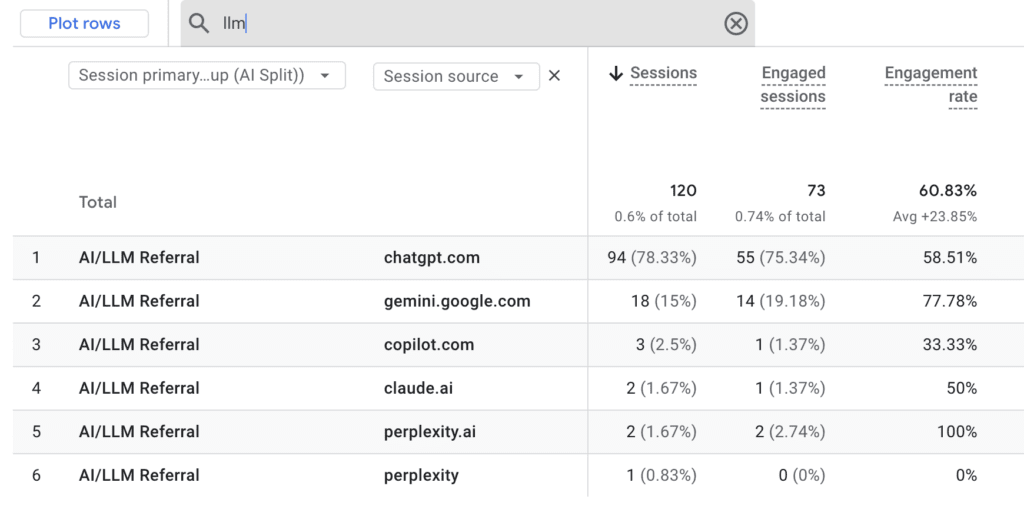
ChatGPT, Perplexity, Gemini and Claude are sending people to your website right now.
You probably can’t see them.
By default, GA4 dumps most of this traffic into ‘direct’ or buries it inside ‘referral’. So the fastest growing source of qualified intent in marketing is showing up in your reports as a rounding error. That’s a problem, because these are often your most valuable visitors. Someone who clicks through from an AI assistant has already had their question answered. They’re closer to a decision than almost any other channel can deliver.
This guide walks through two ways to fix that in GA4. One takes ten minutes. The other takes fifteen, and gives you visibility every time you log in.
Why your AI traffic is invisible
Out of the box, GA4 sorts AI assistants into two unhelpful buckets.
Referral. When the LLM passes a referrer header (which they sometimes do, sometimes don’t).
Direct. When the referrer is stripped, or the visitor came from a desktop app rather than a browser.
Neither tells you what you actually need to know. Which AI tools are sending qualified people. Which prompts and topics are surfacing your brand. How those visitors behave once they arrive.
The default Channel Groups in GA4 don’t include anything for AI, so this traffic gets diluted across the rest of your reports. The fix is to build the visibility yourself.

Method 1: Build an Exploration report
The quickest way to see what is actually happening, without changing anything in your account.
- In GA4, go to Explore and create a Blank report.
- Add these dimensions:
Session source,Session medium,Page referrer. - Add these metrics:
Sessions,Key events(your conversions). - In the settings panel, drag
Session sourceinto Filters. - Set the filter to Matches Regex and paste in the pattern below.
- Visualise as a line chart to track growth over time, or a table to compare sources side by side.
This works well for ad hoc analysis and monthly reporting. The downside is that it only lives in Explore. It won’t flow through to your standard acquisition reports.
Method 2: Create a custom Channel Group
For permanent visibility across every standard report in GA4, build a custom channel group.
- Go to Admin > Data Display > Channel Groups.
- Click Create new channel group and name it something obvious, like ‘AI/LLM Traffic’ or ‘Generative AI’.
- Add a new channel called ‘AI Assistants’.
- Set the rule:
Session sourcematches regex with the pattern below. - Drag the channel above the default ‘Referral’ channel so it takes priority.
- Save.
Once it’s live, AI traffic shows up as its own line in acquisition reports, audience insights and exploration templates. Allow 24 to 48 hours for the new grouping to populate fully.
The regex you need
Here’s a broad pattern that captures the major LLM sources at the time of writing.
.*(chatgpt|openai|perplexity|gemini\.google|copilot\.microsoft|claude\.ai|bard|you\.com|poe\.com).*If you want to be more conservative and only match exact known domains (which avoids false positives from words like ‘ai’ showing up in legitimate referral URLs), use this version.
chatgpt\.com|perplexity\.ai|openai\.com|gemini\.google\.com|copilot\.microsoft\.com|claude\.aiThe second pattern is safer for production reporting. The first is useful when you’re exploring the data and want to surface anything that might be AI related.
LLM / AI Search domains worth tracking
The AI search landscape moves fast, but these are the ones to watch right now.
- ChatGPT:
chatgpt.com - Perplexity:
perplexity.ai - Google Gemini:
gemini.google.com - Microsoft Copilot:
copilot.microsoft.com - Claude:
claude.ai - You.com:
you.com - Poe:
poe.com
Review this list every quarter. New AI tools launch regularly, and the incumbents change their referral domains every now and then. Bing Chat became Copilot. Bard became Gemini. The next rebrand isn’t far away.
Three things to keep in mind
A lot of AI traffic still hides in ‘direct’. Many AI tools strip referrer headers, or send traffic from desktop apps that don’t pass referrer data at all. Whatever you track using these methods will be a meaningful undercount. To get closer to the real number, watch for unusual patterns in direct traffic. Sudden spikes. Unusually high engagement. Visits to deep pages that wouldn’t typically be hit directly.
Attribution gets messy. Someone might discover your brand through Perplexity, then come back via Google a week later to convert. GA4’s last click model will hand the credit to Google. If AI traffic matters to your business, lean on data driven attribution or run cross channel analysis to see the full role it plays in your funnel.
Volumes are still small for most brands. LLM traffic is growing fast, but for most businesses it still represents a tiny share of total sessions. The exceptions are publishers, B2B SaaS and brands with strong topical authority. Those are already seeing real share. The point of setting this up now isn’t the volume today. It’s the trend line over the next twelve months.
What to do with the data
Once you can see the channel clearly, three things become possible.
Identify your AI friendly content. Look at which pages get surfaced by AI tools. These are usually the pages that answer questions directly, structure information cleanly, and have earned topical authority. They’re a template for what to create more of.
Compare AI traffic to traditional organic. In our experience, visitors from AI behave very differently from search visitors. They’ve already had a question answered, so they tend to land deeper in your funnel. That has implications for the CTAs you serve and the next steps you offer.
Track the trend. AI search is now a measurable channel. Establish your baseline, then watch how it grows as you invest in being discoverable inside generative answers. The discipline some are calling GEO, or generative engine optimisation.
The exec-summary
Most marketers can’t see their AI traffic. The ones who can will be a step ahead when this becomes a meaningful share of demand. Which it will, sooner than most people are planning for.
Setting it up takes fifteen minutes. It’s worth doing today.
If you’d like help building this out, mapping the broader generative search picture, or auditing how your content is performing across AI surfaces, get in touch. At Intender, we help brands turn data into people-first decisions.


